
Sage Copilot chatbot and insights step definitions
The following step definitions are available to interact with Sage copilot chatbot and insights:
the user clicks the "(.*)" icon in the navigation bar
the user closes the sage copilot panel
the sage copilot panel is (displayed|hidden)
the user writes (".*") in the sage copilot panel
the user clicks the "(.*)" action in the sage copilot panel
the sage copilot answer contains the pattern
the number of insights in sage copilot panel is "(.*)"
the user clicks the sage copilot insights button in sage copilot panel
the number of insights is "(.*)"
the user clicks the sage copilot insights button
the card "(.*)" in the sage copilot panel is (displayed|hidden)
the user selects the card with title "(.*)" in the sage copilot panel
the user selects the table in the sage copilot panel
the user selects the row that has the text "(.*)" in column with header: "(.*)" in the sage copilot panel
the user selects the cell with header: "(.*)" of selected row in the sage copilot panel
the value of the selected cell is "(.*)" in the sage copilot panel
the user clicks the selected cell in the sage copilot panel
the text in the sage copilot card contains the parttern
the user clicks the expand detail link in the sage copilot panel
Examples
Extract from sample: 05A-SageCopilotChatbotAndInsights
Then the sage copilot panel is hidden
When the user clicks the "Sage Copilot" icon in the navigation bar
Then the sage copilot panel is displayed
When the user closes the sage copilot panel
Then the sage copilot panel is hidden
Extract from sample: 05A-SageCopilotChatbotAndInsights
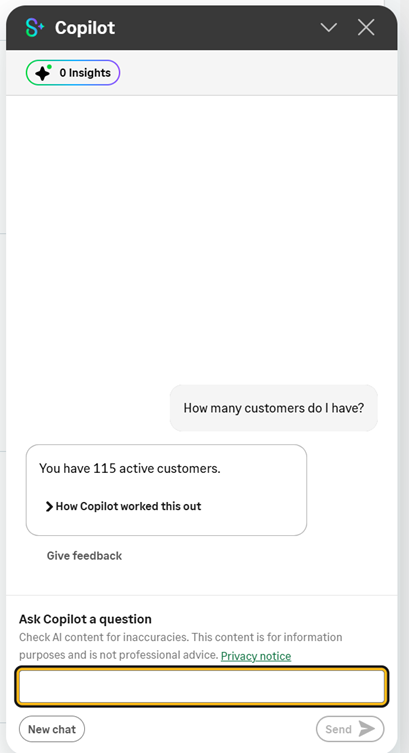
Scenario: 05A2 - Sage copilot - How to interact with Sage Copilot chatbot
When the user clicks the "Sage Copilot" icon in the navigation bar
#Sage Copilot - Verify state visibility
Then the sage copilot panel is displayed
#Sage Copilot - Interact with the chatbot using (user) stored values
When the user writes "How many [USV_CUSTOMER] do I have?" in the sage copilot panel
And the user takes a screenshot
And the user clicks the "Send" action in the sage copilot panel
Then sage copilot answer contains the pattern
"""
You have * active [USV_CUSTOMER].
"""
Then the number of insights in sage copilot panel is "0"
And the user clicks the sage copilot insights button in sage copilot panel
When the user closes the sage copilot panel
#Sage Copilot - Verify state visibility
Then the sage copilot panel is hidden
Extract from sample: 05A-SageCopilotChatbotAndInsights
Scenario: 05A3 - Sage copilot - How to Control Sage copilot insights and interact with them
Given the user opens the "GESBPC" function
And the "Customer" screen is displayed
#Sage Copilot - Verify the number of insights
Then the number of insights is "7"
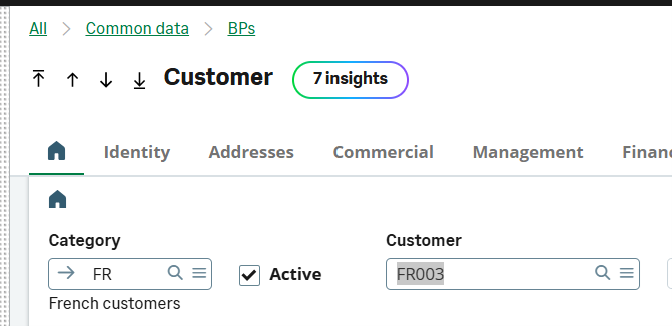
#Sage Copilot - Verify insight card state visibility
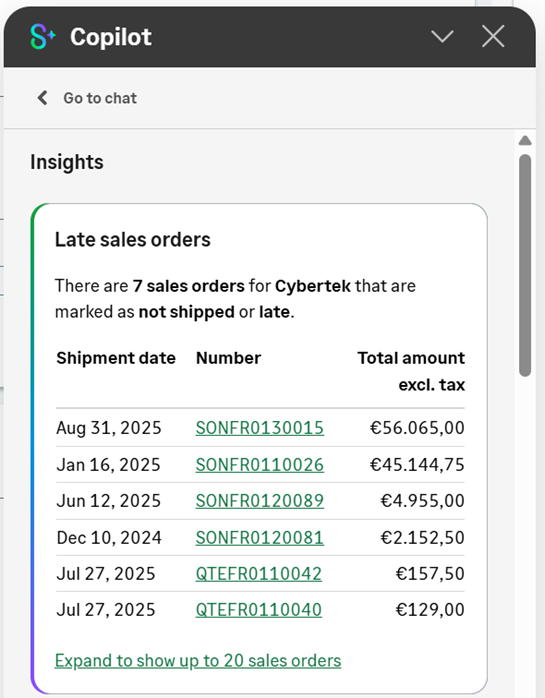
Then the card "Late sales orders" in the sage copilot panel is displayed
#Sage Copilot - Verify insight card content using string patterns or stored values or both
When the user selects the card with title "Late sales orders" in the sage copilot panel
Then the text in the sage copilot card contains the pattern
"""
There are 7 sales orders for Cybertek that are marked as not shipped or late.
"""
Then the text in the sage copilot card contains the pattern
"""
There are [USV_NUMBER] sales orders for [ENV_CUSTOMER_NAME] that are marked as not * or late.
"""
#Sage Copilot - Expand the results
When the user selects the card with title "Late sales orders" in the sage copilot panel
And the user clicks the expand detail link in the sage copilot panel
#Sage Copilot - Click the insight button in the sage copilot panel
And the user clicks the sage copilot insights button in sage copilot panel
#Sage Copilot - Verify the result of the table in Sage copilot panel
When the user selects the card with title "Late sales orders" in the sage copilot panel
When the user selects the table in the sage copilot panel
And the user selects the row that has the text "Jan 16, 2025" in column with header: "Shipment date" in the sage copilot panel
And the user selects the cell with header: "Total amount excl. tax" of selected row in the sage copilot panel
Then the value of the selected cell is "€45.144,75" in the sage copilot panel
When the user selects the cell with header: "Number" of selected row in the sage copilot panel
Then the value of the selected cell is "SONFR0110026" in the sage copilot panel
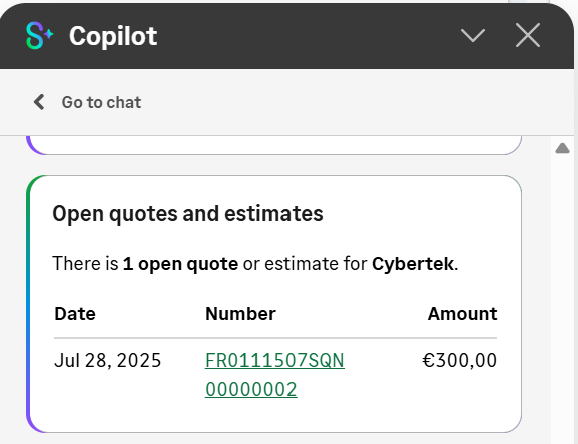
When the user selects the card with title "Open quotes and estimates" in the sage copilot panel
When the user selects the table in the sage copilot panel
And the user selects the row that has the text "[USV_DATE]" in column with header: "Date" in the sage copilot panel
When the user selects the cell with header: "Number" of selected row in the sage copilot panel
Then the value of the selected cell is "[USV_REFSQN]" in the sage copilot panel
#Sage Copilot - Click the cell in the sage copilot panel
And the user clicks the selected cell in the sage copilot panel